Rebuilding the operations so the team could run them without me
Overview
Enibas is my family's jewellery business in West Cork. Two shops, a workshop, wholesale and online. I spent the first weeks mapping every hand-off and sitting with the people making them.
Few of the team are technical. That set the brief. Whatever I built had to be run by people whose actual job is making jewellery or serving customers, and also had to keep working after I stepped back.
200 manufacturing orders a month now flow from sale to workshop hands-free, and the team runs it day-to-day without me.
AI sits in two places here, and each needs its own rule. It wrote most of the code. It also runs inside the system, reconciling stock overnight and flagging what looks wrong. With no engineer on staff, a bad automatic write has nobody to catch it. So most of the work was deciding where the person goes, and that sits in a different place for every job.
The problem
Enibas had three systems that didn't talk: Shopify, Vend (stock management), Katana (manufacturing and stock management) in the workshop. So people were the integration.
The same order was typed in by hand four or five times by three different people, stock looked right on screen and was wrong in the room, and production ran off a printout that was stale by lunchtime.
The first move was subtraction. I retired the till system and moved retail onto Shopify, taking three systems of record down to two, with Make.com and Airtable as the layer between them, plus a handful of small custom tools for the jobs the off-the-shelf products wouldn't do.
The full build touched a dozen moving parts: sync engines, self-healing cleanup jobs, forecasting, dashboards. Two problems are worth explaining.
Decision 01 · Katana's list wasn't enough
The broken flow
Production planning was a weekly ritual: the manager built the week's list in Google Sheets, printed it, and handed it to the makers. They picked and ticked on paper; changes were scrawled on the sheet or relayed back, then re-entered into Katana later.
Custom orders were handwritten on top as they arrived. The list was stale by lunchtime, and the manager was the bottleneck for every change.
What I changed
Katana ships with a production list that has no auto-sort, no assignment, no tags and no role-appropriate views, and most businesses bend around it forever. I composed proven platforms into a custom system instead: Airtable, webhooks and Make.com, custom where it matters and standing on foundations that scale.
Webhooks, automations and a sync engine keep Katana and the team's list in lockstep, both ways. The list auto-prioritises the way the business wants, and makers self-assign with one tap, update statuses and flag outsourcing, on an iPad on the workshop floor.
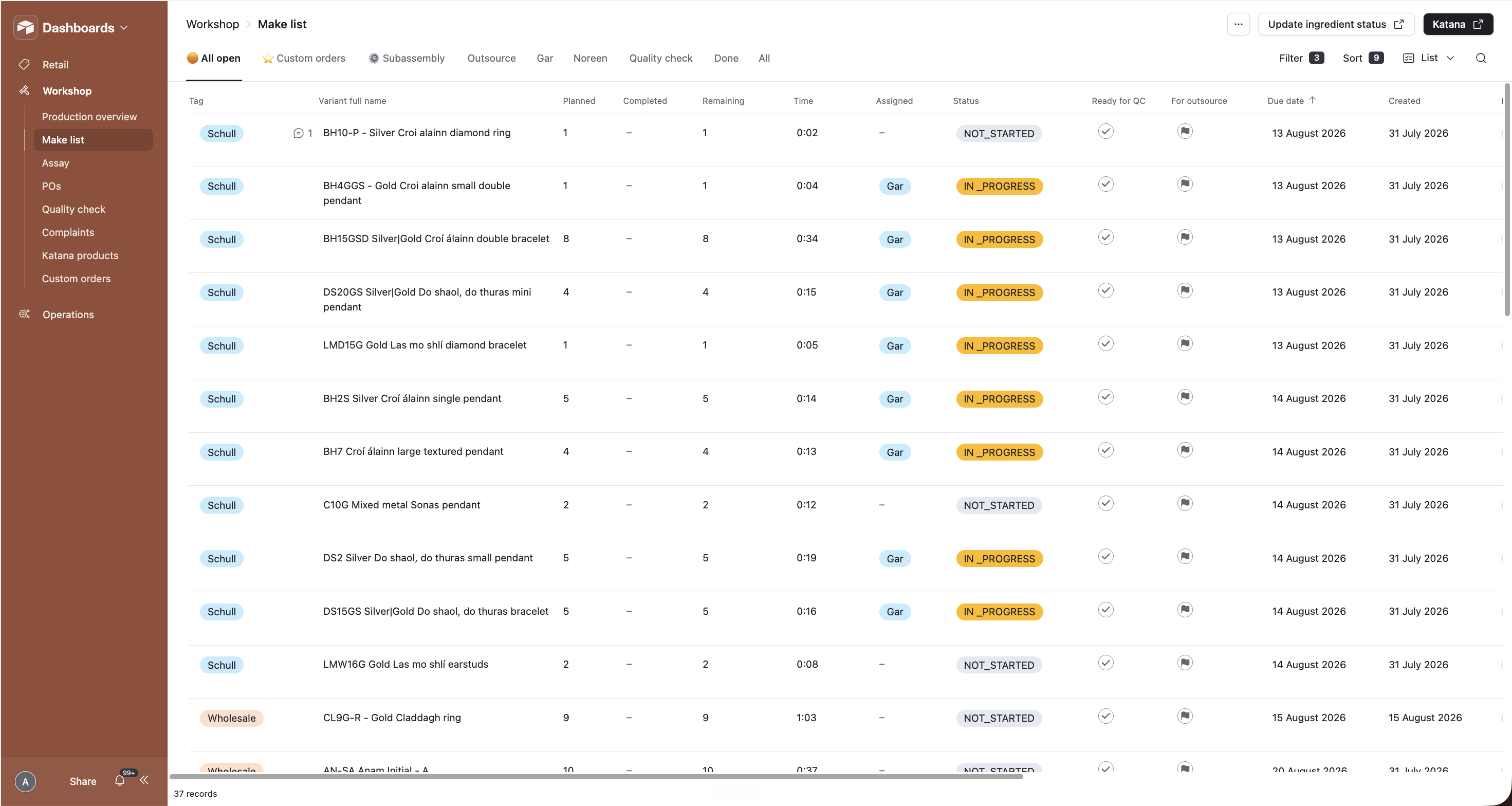
Makers see only what they need, retail get their own custom-orders view, and the same data drives the manager's capacity dashboards.
Self-healing cleanup jobs run underneath, gated so they can never delete anything real, with monitoring on the automations. The team only ever sees a simple list.
The call
Settle for Katana's built-in list: zero build cost, but the workshop bends around the tool forever.
Go fully bespoke: a hand-built app that fits perfectly, then becomes a fragile liability the day I step back.
The middle road: proven platforms composed into a custom system, custom where it matters, solid and scalable underneath.
Decision 02 · Custom orders, inside the tool retail already use
The broken flow
A customer pays for a bespoke piece. Retail hand-write the details on a docket and drop it in a box. The workshop manager collects the box daily, and types every docket into Katana again by hand.
Custom orders never joined the printed make-list; they lived in a separate, manual shadow system. A status check meant walking into the workshop and asking whoever was around. And these are the highest-value, most personal orders in the business: the ones that got lost or made wrong.
What I changed
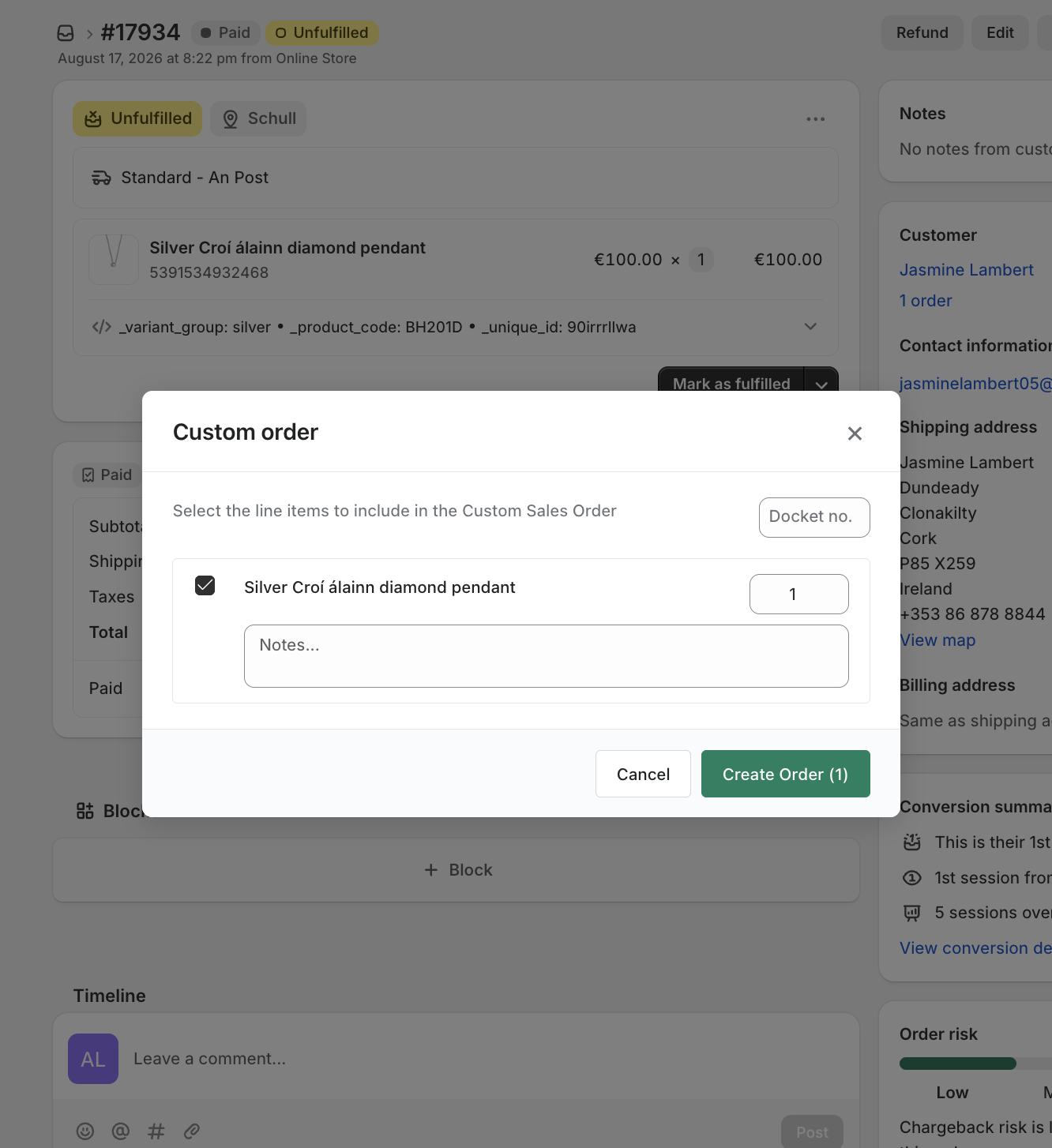
A Chrome extension adds a Custom Order button to the order screen retail already use. A popup asks for the docket number and any workshop notes, and nothing gets re-typed.
The item is picked from the order's real line items, so there's no way to send the wrong piece to the workshop.
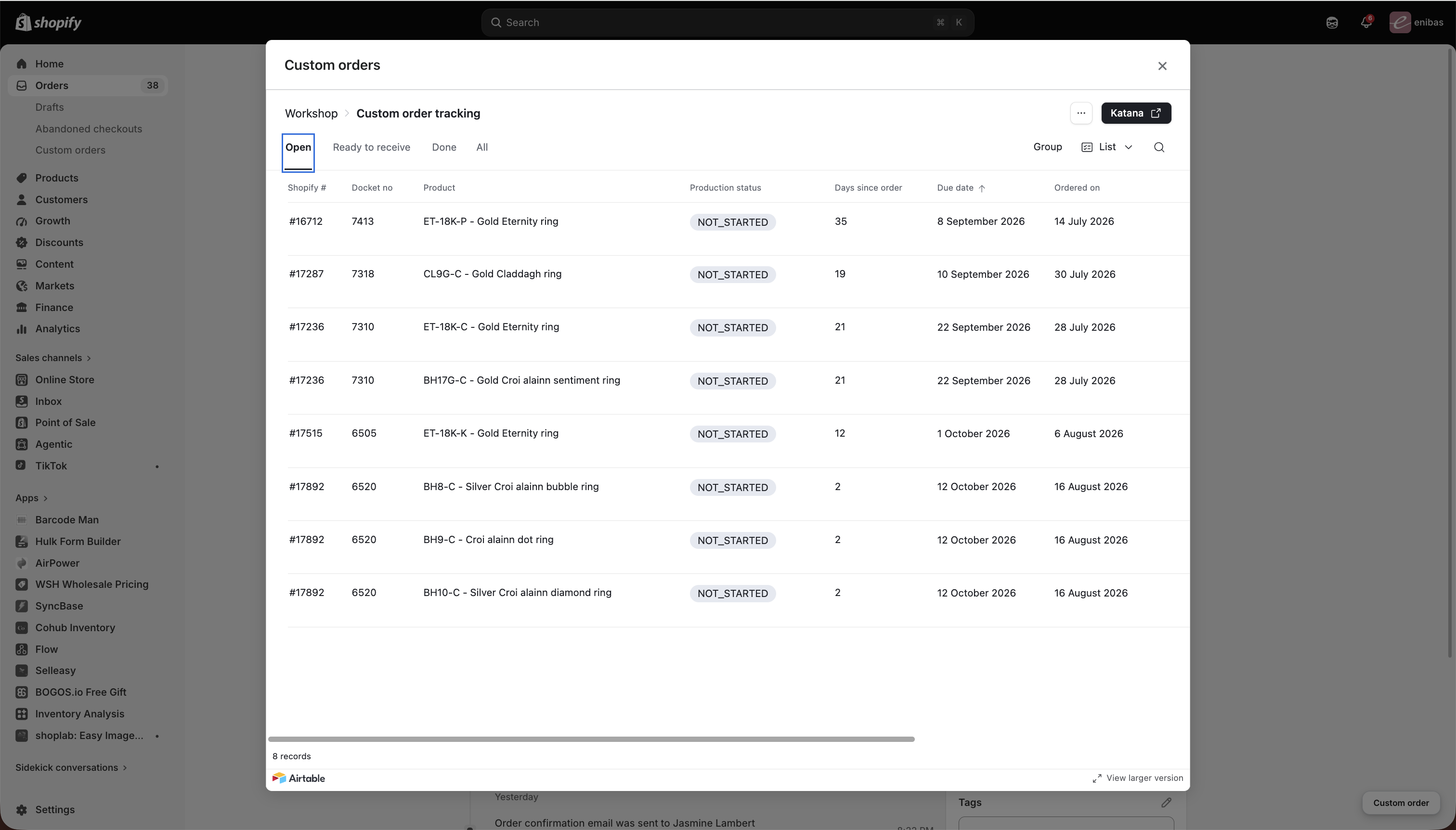
A nav link in Shopify opens the make-list's custom-order view, with live status and notes. No workshop access needed, and no walk across the yard.
The paper docket stays on purpose. It's how the physical piece is kept safe and findable in the workshop.
The call
Give retail Katana access: too much power (data risk) and too much complexity for a non-technical team.
Keep the manual docket flow: errors, forgotten orders, manager burden.
A button that gives retail enough to do the job, and nothing that could break the data.
Reflection
If I did it again, I'd design the operator's view of the system earlier, including its failures, from day one. I built for the system running itself; I under-invested in letting a non-technical manager see it running. When something broke she was flying blind, and a system you can't see into is one you can't fully trust, and trust is what adoption runs on.
The complexity didn't go away. It stopped relying on people to manage it.